This week I was at the FutureCon 2026 security conference. I was able to meet with a lot of sharp minds and hear many great speakers talk on the latest evolutions of risk. To no surprise, AI was embedded in every conversation like a little virus. Most interesting to me was how the conversation was about human behavior, trust, and people.
Every business has been going through (or very soon will be) the process of figuring out if AI has a role in their business, if their team is already using it (they are), and how to handle this data privacy beast.
What's the Role Then?
I'm sure every tech enthusiast has already told you about how AI can do next to everything. If not now, it soon will! Right? Eh, I don't think so. The reality is, it's good at specific things, at specific times, and in specific scenarios. If that seems like a lot of qualifiers to you, I'd agree. My short answer to where it's useful is that it's great at doing repetitive processes with very structured information.
Depending on your business and your role in said business, your best use of AI can vary. I know that's not a helpful answer. However, it is important to understand that AI isn't the swiss army knife of apps and here to solve everything. Here is a short list of simple things I've found AI to be pretty helpful for:
- Grabbing comparison and research data on different products to help you narrow down the best options, fast. Make sure to ask it to provide source links so you can verify the information.
- Formatting and/or merging data. If you can write a wall of text in a streamlined fashion, AI can make it all pretty. It's like spell check for formatting and presentation. Similarly, if you need to merge two spreadsheets or documents, it can do that as well!
- Building plan frameworks. When you've done all the preparation for a project and need to compile everything, AI is great about building out the project plan. Furthermore, if you've run an ad-hoc project and taken good enough notes, AI can build you a project plan or SOP for the next time you need it. But none of us ever do that, right?
These are just a few examples of everyday uses that are helpful for me. Many colleagues of mine use it for quite elaborate needs (with a whole lot of correction). I respect that there's a mile long list of other cases, and I'd love to hear yours! Let me know your examples in the comments of this article, please. I want to hear the best examples of use where it's accurate over 95% of the time.
Is Our Team Using AI? They are? OMG Where's The Data Going?
Without a doubt, AI is one of those tech solutions that's so simple to use and leading staff to setup personal accounts. They're trying systems like ChatGPT to see what fun things it can do but also, more importantly, how it can help them do their work faster.
Working at Framework IT, I have strategy calls with businesses near daily and we've been talking a lot about how they take a unified company approach to AI. Some firms outright say it doesn't have a fit for them. In some cases, that's true. In most cases, after analyzing their firewall logs, we find that may not be as true as they thought. From the log reviews I've done, I'm finding that 20% of staff are already using AI across various industries.
The majority of usage is ChatGPT and through personal accounts. At the FutureCon conference, Mariana Padilla with Harmonic Security gave an amazing talk. In her "The AI Genie Is Already Out of the Bottle- Now What?" presentation, Mariana shared the aiusageindex.com research that her team at Harmonic Security conducted, and it backs this up. Go take a look at which tools are used the most and which have the most sensitive data submissions.
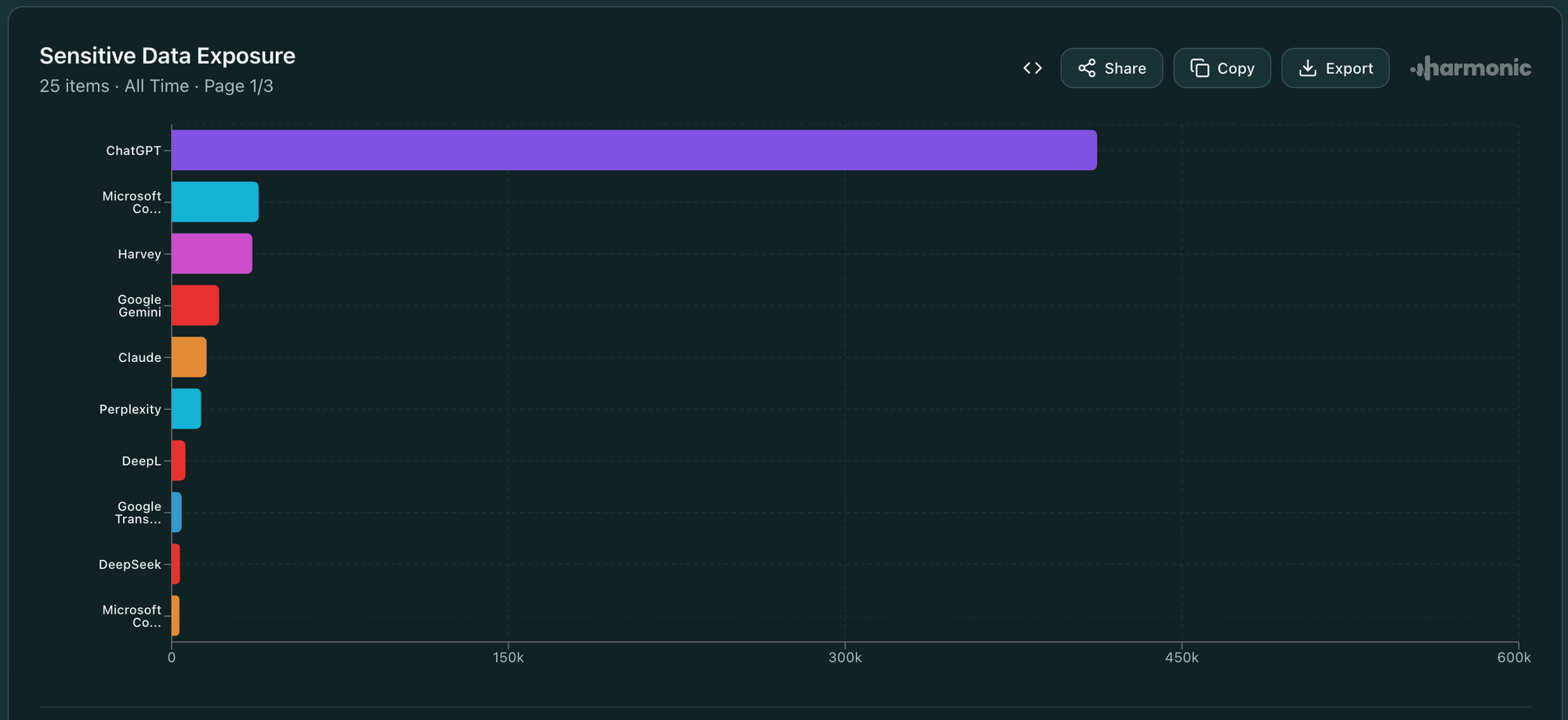
After having this conversation with a business, and their eyes widening, we often move into the now what conversation. The first instinctive reaction is usually to just outright ban as much of it as you can. However, you need to start with rules for your team. Once your firm acknowledges AI is being used and is on the same page that there is a valid business case for using AI, get the policy written down.
Saying "no" without an understanding of why is a recipe for disaster. This will lead to shadow AI use as this genie is not going away. Mariana dubbed this the "teenager rules" phase of AI. The team will use their cell phones, personal computers, personal accounts, VPN, etc.
With your steering committee and/or key decision makers, decide what solutions are safe and acceptable to use. What's the typical tech adoption persona of your company look like? At Framework we provide a solution that's structured from hatz.ai. They've built a platform that assures zero data training, no retention in LLMs, etc. Read more about their solid security principles here.
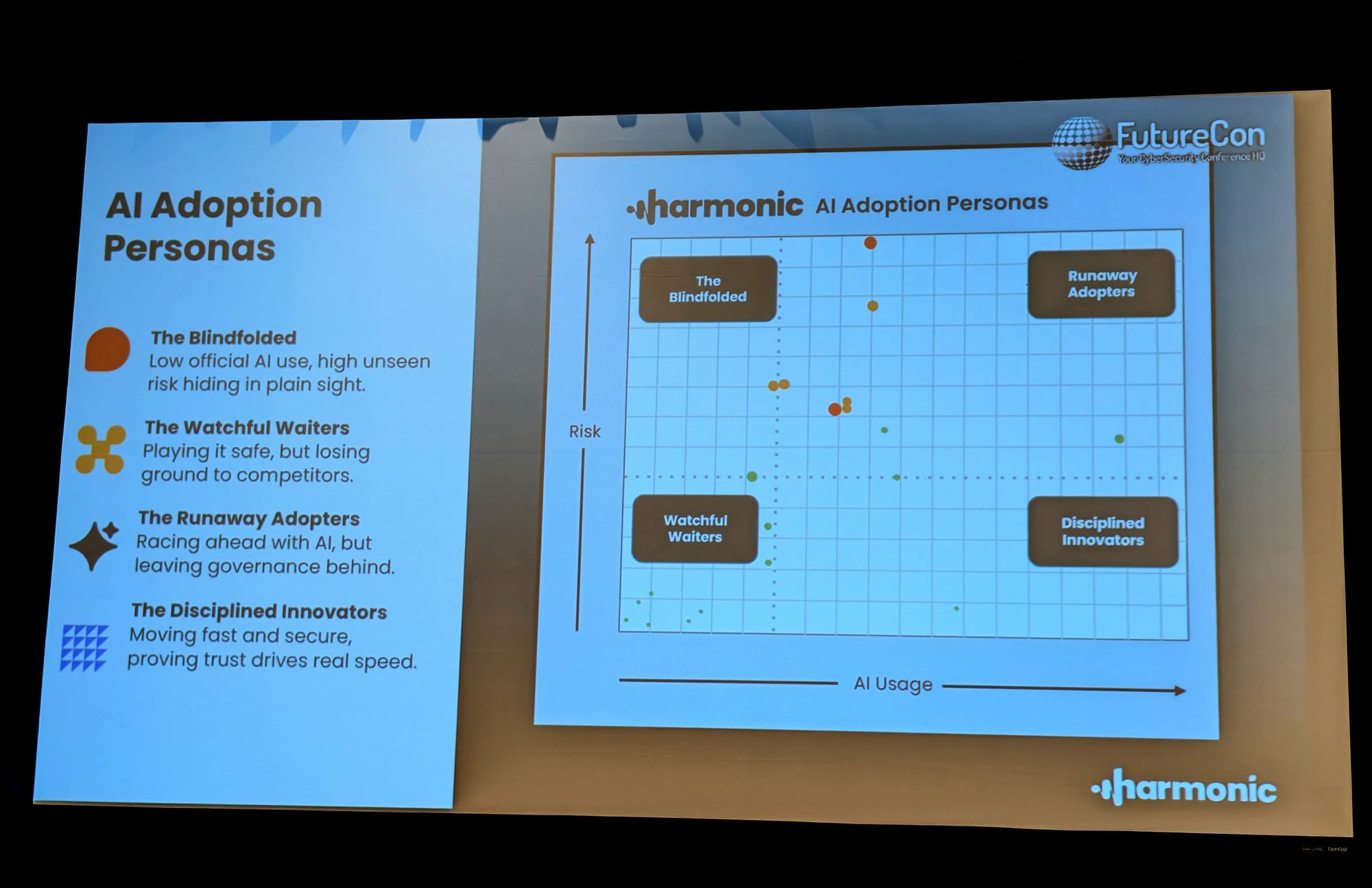
Once you have the allowed solutions decided on, you can build out your AI Use Policy. The policy should state who within the organization is allowed to use AI and what type of data it can be used with. After that, I recommend stating something to the effect of only the company provided and allowed solutions should be used. No other systems should have any company or client data use for privacy and protection.
Get this new policy into the hands of your team and then, only then, start banning all the unapproved solutions. If you start banning beforehand, then they will be off on personal devices and that's much harder to detect and control.
With one short but helpful AI policy in place, you'll be able to help guide, enable, and build trust with your team. Yes, there is a good amount of planning to go into choosing the proper solutions and building out said policy. No, it's not too late. Teenager rules might be in play, but AI isn't going away. Every company needs to figure out how to swim with AI instead of simply drowning with it. Data protection and privacy laws aren't going to allow doing nothing. Build a path forward with trust and enablement at the root of solution.
*No AI was used to write this article. To err is human. I do it a lot!